What's inside
Form content
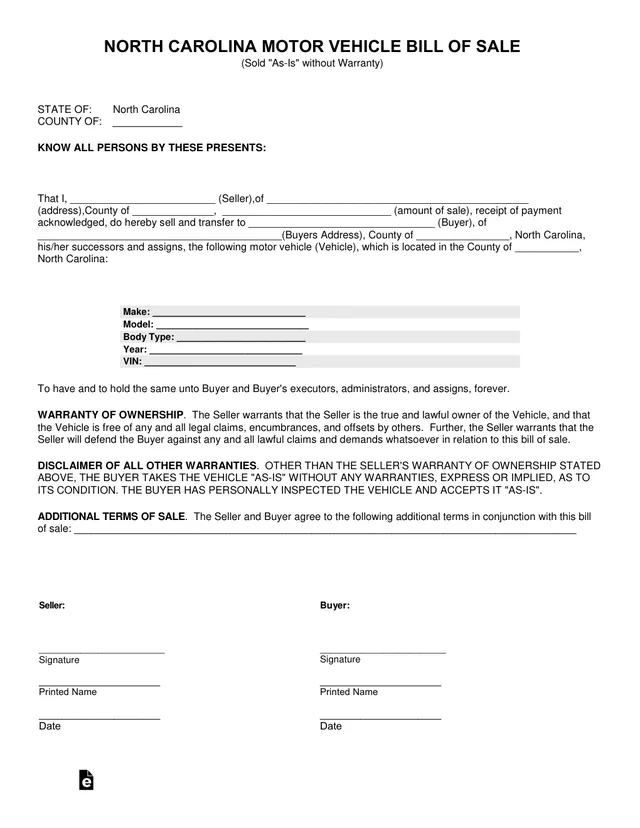
NORTH CAROLINA MOTOR VEHICLE BILL OF SALE
(Sold "As-Is" without Warranty)
STATE OF:
North Carolina
COUNTY OF: ____________
KNOW ALL PERSONS BY THESE PRESENTS:
That I, _________________________ (Seller),of _____________________________________________
(address),County of ______________, _____________________________ (amount of sale), receipt of payment acknowledged, do hereby sell and transfer to ________________________________ (Buyer), of
__________________________________________(Buyers Address), County of ________________, North Carolina, his/her successors and assigns, the following motor vehicle (Vehicle), which is located in the County of ___________,
North Carolina:
Make: _____________________________
Model: _____________________________
Body Type: _____________________________
Year: _____________________________
VIN: _____________________________
To have and to hold the same unto Buyer and Buyer's executors, administrators, and assigns, forever.
WARRANTY OF OWNERSHIP. The Seller warrants that the Seller is the true and lawful owner of the Vehicle, and that the Vehicle is free of any and all legal claims, encumbrances, and offsets by others. Further, the Seller warrants that
How to fill it
Fill or edit this form in MePDF
- Preview page 1 to confirm the form name and revision.
- Select Fill form to answer the form one page at a time.
- Type an answer for each field; checkboxes and choices use the form’s own options.
- Preview the finished pages, then download the flattened PDF.
- The downloaded copy is image-only, so it cannot be edited as a form again.
Use the registered business name and the correct tax identifier. The editor keeps the original layout while you fill the existing fields.