What's inside
Form content
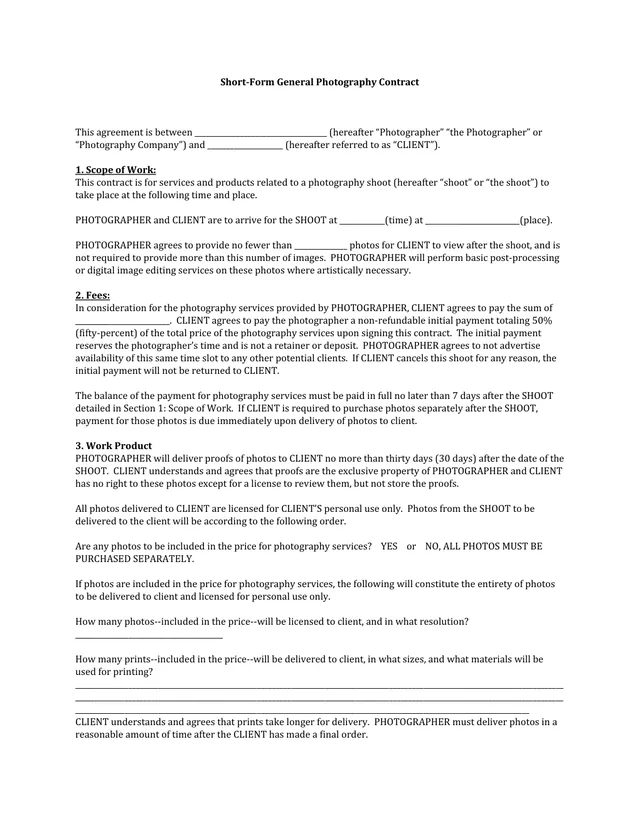
Short-Form General Photography Contract
This agreement is between ___________________________________ (hereafter “Photographer” “the Photographer” or
“Photography Company”) and ____________________ (hereafter referred to as “CLIENT”).
1. Scope of Work:
This contract is for services and products related to a photography shoot (hereafter “shoot” or “the shoot”) to take place at the following time and place.
PHOTOGRAPHER and CLIENT are to arrive for the SHOOT at ____________(time) at _________________________(place).
PHOTOGRAPHER agrees to provide no fewer than ______________ photos for CLIENT to view after the shoot, and is not required to provide more than this number of images. PHOTOGRAPHER will perform basic post-processing or digital image editing services on these photos where artistically necessary.
2. Fees:
In consideration for the photography services provided by PHOTOGRAPHER, CLIENT agrees to pay the sum of
_________________________. CLIENT agrees to pay the photographer a non-refundable initial payment totaling 50%
(fifty-percent) of the total price of the photography services upon signing this contract. The initial payment reserves the photographer’s time and is not a reta
How to fill it
Fill or edit this form in MePDF
- Preview page 1 to confirm the form name and revision.
- Select Fill form to answer the form one page at a time.
- Type an answer for each field; checkboxes and choices use the form’s own options.
- Preview the finished pages, then download the flattened PDF.
- The downloaded copy is image-only, so it cannot be edited as a form again.
Use the registered business name and the correct tax identifier. The editor keeps the original layout while you fill the existing fields.