What's inside
Form content
Page 1
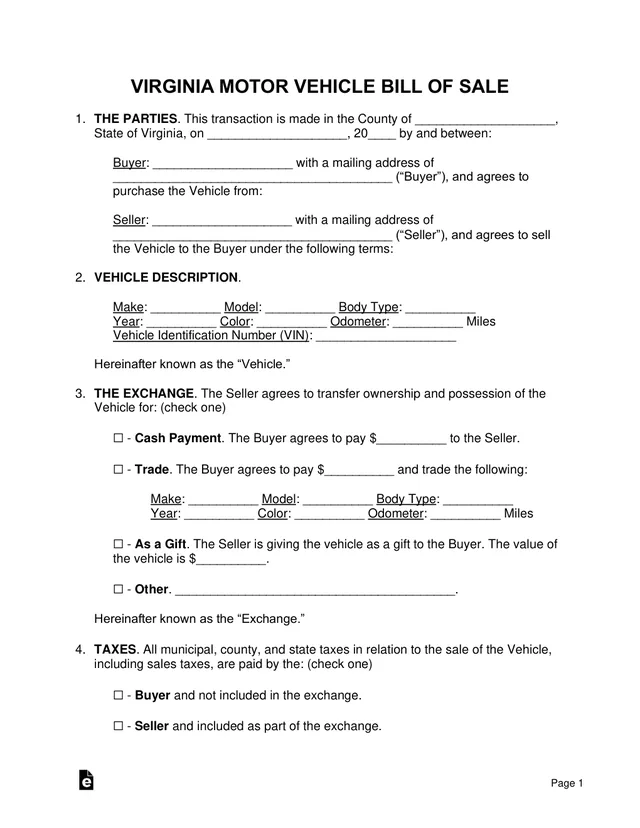
VIRGINIA MOTOR VEHICLE BILL OF SALE
1. THE PARTIES. This transaction is made in the County of ____________________,
State of Virginia, on ____________________, 20____ by and between:
Buyer: ____________________ with a mailing address of
________________________________________ (“Buyer”), and agrees to purchase the Vehicle from:
Seller: ____________________ with a mailing address of
________________________________________ (“Seller”), and agrees to sell the Vehicle to the Buyer under the following terms:
2. VEHICLE DESCRIPTION.
Make: __________ Model: __________ Body Type: __________
Year: __________ Color: __________ Odometer: __________ Miles
Vehicle Identification Number (VIN): ____________________
Hereinafter known as the “Vehicle.”
3. THE EXCHANGE. The Seller agrees to transfer ownership and possession of the
Vehicle for: (check one)
☐ - Cash Payment. The Buyer agrees to pay $__________ to the Seller.
☐ - Trade. The Buyer agrees to pay $__________ and trade the following:
Make: __________ Model: __________ Body Type: __________
Year: __________ Color: __________ Odometer: __________ Miles
☐ - As a Gift. The Seller is giving the vehicle as a gift to the Buyer. The value o
How to fill it
Fill or edit this form in MePDF
- Preview page 1 to confirm the form name and revision.
- Select Fill form to answer the form one page at a time.
- Type an answer for each field; checkboxes and choices use the form’s own options.
- Preview the finished pages, then download the flattened PDF.
- The downloaded copy is image-only, so it cannot be edited as a form again.
Use the registered business name and the correct tax identifier. The editor keeps the original layout while you fill the existing fields.