What's inside
Form content
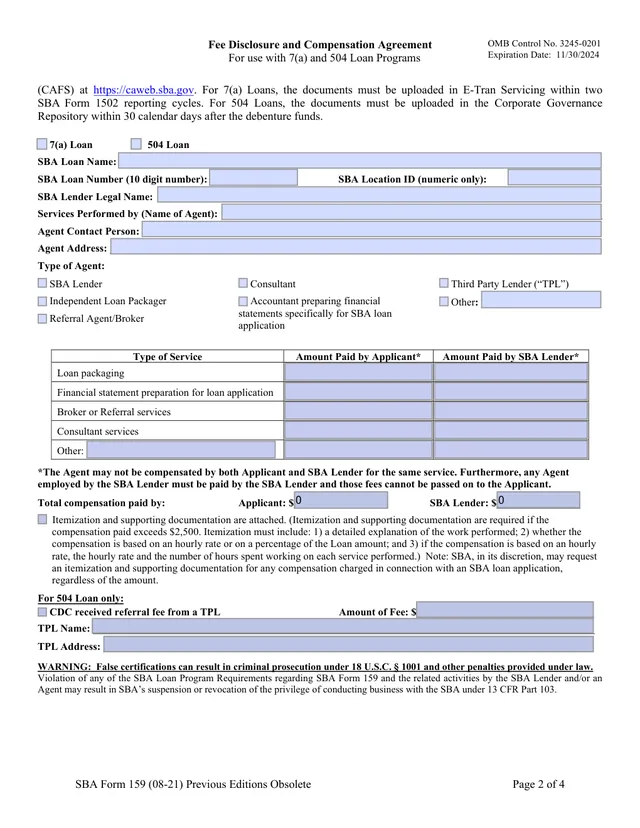
Fee Disclosure and Compensation Agreement
For use with 7(a) and 504 Loan Programs
OMB Control No. 3245-0201
Expiration Date: 11/30/2024
SBA Form 159 (08-21) Previous Editions Obsolete
Purpose of this Form: The purpose of this Form is to identify Agents and the fees and/or compensation paid to Agents by or on behalf of a small business applicant (“Applicant”) for the purpose of obtaining or expediting an application for a loan guaranteed by the U.S. Small Business Administration (SBA). This is a statutory requirement under 15 U.S.C. 642.
See 13 CFR Parts 103 and 120 and SBA’s Standard Operating Procedure 50 10 for the rules governing compensation of
Agents or SBA Lenders in connection with an SBA loan.
Who must complete this Form: Whenever an Agent is paid by, either, the Applicant or the SBA Lender to assist them in connection with the SBA loan application, this Form must be completed and signed by: the SBA Lender, the Applicant and the Agent. For each Agent, a separate Form 159 must be completed and signed, and the SBA Lender and Applicant, both, must, also, sign and date the Form.
The SBA Lender must inform the Applicant in writing that the Applicant is not required to employ an
How to fill it
Fill or edit this form in MePDF
- Preview page 2 to confirm the form name and revision.
- Select Fill form to answer the form one page at a time.
- Type an answer for each field; checkboxes and choices use the form’s own options.
- Preview the finished pages, then download the flattened PDF.
- The downloaded copy is image-only, so it cannot be edited as a form again.
Use the registered business name and the correct tax identifier. The editor keeps the original layout while you fill the existing fields.